
Toddler Screen Time Without the Guilt: A Calm Parent's Guide (Ages 1-5)
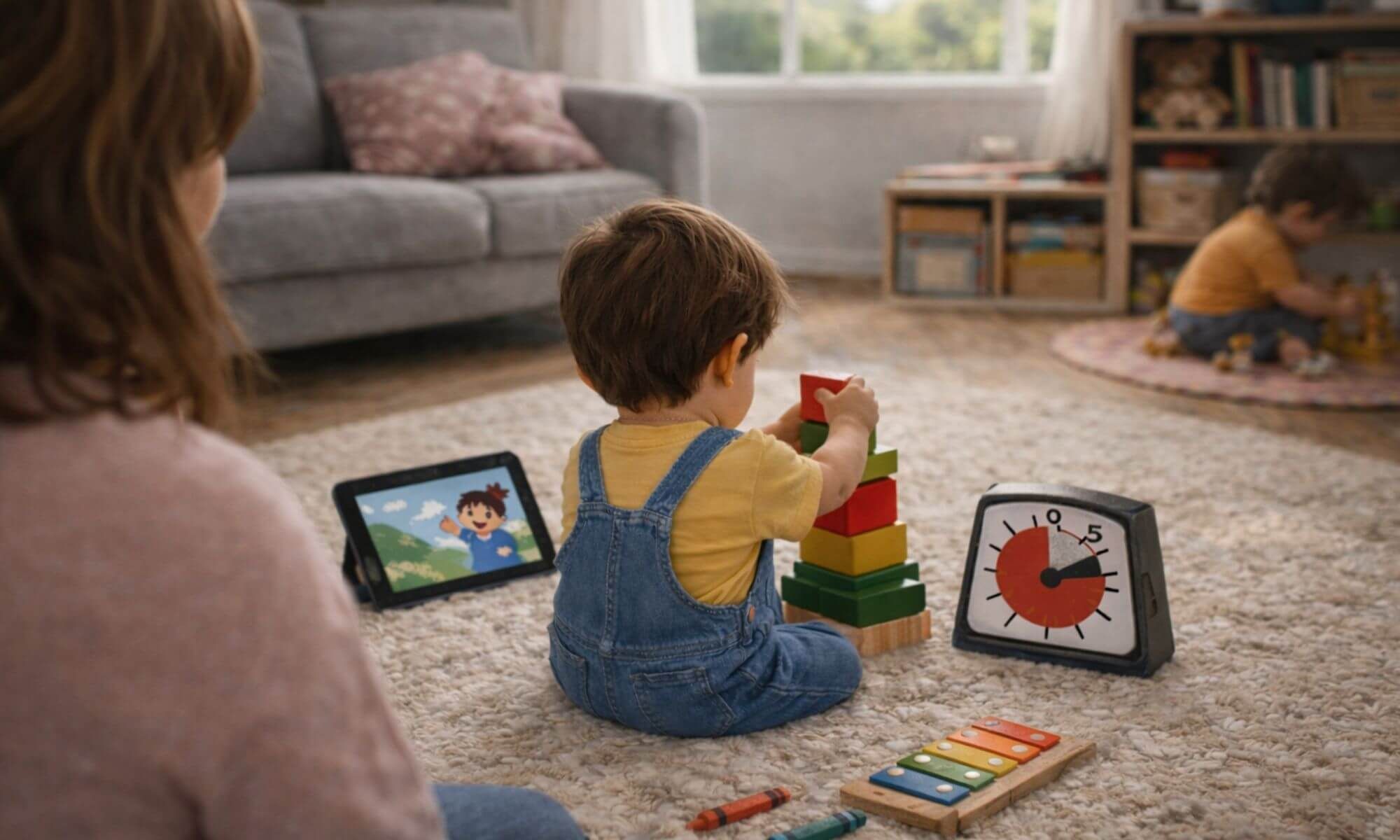
Screen time is a tool, not a failure. Here's a calm plan for ages 1-5: quality-first media, predictable transitions, and play-rich alternatives that reduce meltdowns.
If you've ever felt a pang of guilt while handing your phone to your toddler so you could finish a hot cup of coffee or a work email, you aren't alone.
In the modern world, screen time isn't a "failure" it's a tool. However, it's a tool that can quickly become a source of power struggles and epic meltdowns if we don't have a plan.
The goal isn't to banish technology, but to create a sustainable ecosystem where screens have a place, but don't take over the childhood experience. Here is how to build a calm, realistic screen-time boundary that respects both your child's development and your own sanity.
Shifting the Mindset: Quality Over Restriction
The American Academy of Pediatrics (AAP) suggests avoiding screens (except video chatting) before 18-24 months and limiting children ages 2-5 to one hour of high-quality programming per day. While those numbers are helpful benchmarks, the quality of the interaction matters far more than the minutes on the timer.
Rather than acting as the "Screen Police," try to view yourself as a "Media Mentor." This shift moves the focus from a battle of wills to a shared learning experience.
Active vs. Passive Consumption
Is your child mindlessly scrolling through auto-play clips, or are they engaging with a story? Look for content that encourages movement, like follow-along dances, or content that asks the viewer questions and pauses for a reply.
Co-viewing as Connection
When possible, sit with them for even five minutes of their show. Ask, "What color is that bird?" or "Why do you think the bear is sad?" This turns a solo, passive activity into a language-building moment and helps their brain connect what's happening on the screen to the real world.
The "Slow-Paced" Rule
The pace and style of a show can matter—especially right after viewing. Some studies suggest certain fast-paced or highly fantastical content may temporarily make it harder for young kids to regulate attention and impulses. If you notice a "wobbly" mood after screens, try slower, calmer shows, keep it short, and watch together when you can.
Creating a "Yes" Space
To reduce screen dependency, your child needs a physical environment that invites independent play. If the living room is centered entirely around a giant TV, they will naturally gravitate toward it as the only source of entertainment.
The Strategy: Set up "Invitation to Play" zones. Use items like a play gym (optional), a soft floor pillow , or a low shelf with stacking cups to create tactile areas. When the environment is rich with sensory options, things they can touch, chew, and stack, the "allure" of the glowing screen begins to fade because their hands are busy exploring.
The Golden Rule: Predictable Boundaries
Tantrums usually happen because of a lack of transition. To a toddler, a screen is a high-dopamine experience; when it vanishes instantly, it feels like a physical shock to their system. The secret to a calm exit is making the end of screen time feel like a predictable, natural conclusion rather than an executive decision from "The Boss."
Visual Timers
Toddlers don't understand the abstract concept of "5 minutes." Use a visual timer (where a red disc disappears) or a sand timer. This allows them to see time moving.
The "One More" Rule
Always give a countdown based on the content, not just the clock. "One more episode," or "When this song is over, we close the iPad."
The Power of the Power Button
Whenever possible, let them push the button to turn it off. This gives the child a sense of agency and closure.
Bridge the Gap
Don't just turn off the TV and walk away. Suggest a specific "Next Step" immediately. "The TV is going to sleep, and now it's time for us to see how high we can stack these blocks."
Parent Scripts: The Language of Limits
Script 1: The Pre-Transition Warning
"I see you're enjoying this show! We have time for one more song. After the song, we are going to turn the screen off and use our toys to build a tower. Do you want the red block or the blue block first?"
Script 2: During the Meltdown
"I hear you. You're upset because you want more videos. It's okay to be sad. The iPad is taking a nap now so its battery can get strong. Let's go get some water in your big-kid cup and find your favourite book."
Script 3: Establishing the Routine
"In our house, we check our bodies first. Did we eat breakfast? Did we get dressed? Great! Our bodies are ready, so now we can have 20 minutes of Vitamin Screen."
High-Touch Alternatives
Often, we use screens because we need the child to stay in one spot. You can achieve this same "contained play" with sensory-rich toys that engage the brain differently.
Sensory Play
A small "busy basket" (stacking cups, chunky blocks, water-wow books, sticker pad) can keep hands busy without the screen. If you want a couple of grab-and-go textures, a silicone bib and a simple sensory toy can work well.
Open-Ended Toys
A balance board (like a Wobbel, optional) can be a bridge, a slide, or a lounge chair, keeping them physically active while you finish your tasks.
The 7-Day Screen Reset Plan
If you feel like screen time has spiraled out of control, don't panic. Use this one-week plan to recalibrate your home's energy.
| Day | Focus | Action Step |
|---|---|---|
| Day 1 | Observation | Don't change anything. Note when you reach for the screen (e.g., while cooking dinner). |
| Day 2 | Screen Reset Day | Try a low-screen day (or a half-day). Expect some fuss—prep a "busy basket" ahead of time. Optional: Moonkie Sensory Toys. |
| Day 3 | New Zones | Create a "Screen-Free Zone" (e.g., the dining table or bedroom). Set up a cozy reading nook with a Modern Nursery Floor Pillow. |
| Day 4 | The Menu | Create a visual "Screen Menu." Print 3 pictures of approved shows. Let them choose one. |
| Day 5 | Timed Re-Entry | Introduce one 20-minute block. Use a "First/Then" statement: "First we do a puzzle, then we watch a show." |
| Day 6 | Active Co-Viewing | Watch with them. Talk about the characters' feelings to build emotional intelligence. |
| Day 7 | The Maintenance | Establish your "Normal." Maybe it's 30 mins while you prep dinner and nothing else. Stick to it. |
Handling the "Post-Screen Hangover"
Have you noticed your child is crankier after a show? That's a really common post-screen transition wobble—their body is switching from high-stimulation to real life. To help them land softly:
- Dim the lights.
- Offer a physical snack. Something crunchy helps ground their senses.
- Engage the hands. Hand them something like a doll to help them focus on a physical task.
FAQ: Your Common Questions Answered
How much screen time for a 2-year-old?
AAP guidance suggests about one hour per day of high-quality programming for ages 2-5, ideally with co-viewing. WHO guidance for ages 2-4 recommends no more than one hour of sedentary screen time, and less is better. Use those as gentle guideposts, then adjust based on your child's mood, sleep, and context.
What counts as screen time (video calls, background TV)?
Any time a screen is on and holding your child's attention counts as screen time. Video calls are generally treated differently because they're interactive. Background TV still adds stimulation and can pull attention, even if no one is "watching."
Is "educational" screen time better?
Generally, yes. Look for shows with slow pacing and direct address (characters looking at the camera and pausing for a response). Avoid high-speed, flashing content which can overstimulate developing brains.
What if I have an emergency and need them to watch longer?
Give yourself grace. One long movie afternoon because you're sick or have a deadline won't ruin their development. It's the consistent daily habits that matter most.
My 3-year-old throws the remote when I turn it off. What do I do?
Safety first. Take the remote and say, "I can't let you throw things. It shows me your body is having a hard time saying goodbye to the TV." Then, provide a physical alternative like a Modern Nursery Play Mat where they can safely roll or jump out their frustration.
Should I use screen time as a reward for eating dinner?
Try to avoid using screens as a "bribe." This makes the screen seem like a "high-value prize" and vegetables seem like a "chore." Instead, make screen time a predictable part of the schedule.
At what age can they have their own tablet?
Most experts recommend waiting as long as possible (ideally age 6+ for personal devices). For ages 1-5, a shared family screen is better for monitoring and maintaining boundaries.
Final Thoughts
The goal of managing screen time isn't to achieve a state of digital perfection or to eliminate technology entirely. It is about reclaiming the rhythm of your home.
When you replace the "autopilot" habit of turning on a screen with intentional transitions and predictable boundaries, you reduce the friction in your daily life.
Remember that a few minutes of frustration during a transition is a sign that your child is learning to regulate their impulses, a skill that will serve them for a lifetime. Be patient with them, and more importantly, be patient with yourself.
Some days will be more screen-heavy than others, and that is okay. As long as you keep returning to a foundation of connection and play, you are doing a wonderful job navigating the complexities of modern parenting.
Sources (for further reading):
- American Academy of Pediatrics: Media and Young Minds (policy statement)
- HealthyChildren (AAP): How to Make a Family Media Plan
- Mayo Clinic overview of AAP screen time guidance
- World Health Organization: guidance on sedentary screen time for young children
- Lillard & Peterson (2011): fast-paced TV and short-term executive function effects
- Hinten et al. (2025) meta-analysis (fantasy/context effects and mixed findings)
Trusted picks + partner perks
We only share brands we trust and try ourselves. Get honest recommendations and subscriber-only discounts for parents we love.
Related stories
 Parents
The Calm Parent's Guide to Traveling With a Baby
Calm flight + road trip tips, packing lists by age, and gear that reduces the little frictions.
 Parents
10 Cozy Baby Nursery Decor Ideas That Feel Like A Storybook
Ten cozy baby nursery decor ideas, from woodland murals to teepee reading nooks, for a calm storybook room.
 Parents
11 Nautical Nursery Ideas for a Calm Coastal Baby Room
Eleven gentle nautical nursery ideas, from soft wave walls to rope baskets, for a calm coastal baby room.